The complete app

One place for the life you are already living.

EuVio connects daily logistics to longer-term direction without turning either into a game. Every feature is designed to reduce switching, preserve context, and leave the final judgment with you.

Local-first Works without AI No account No tracking
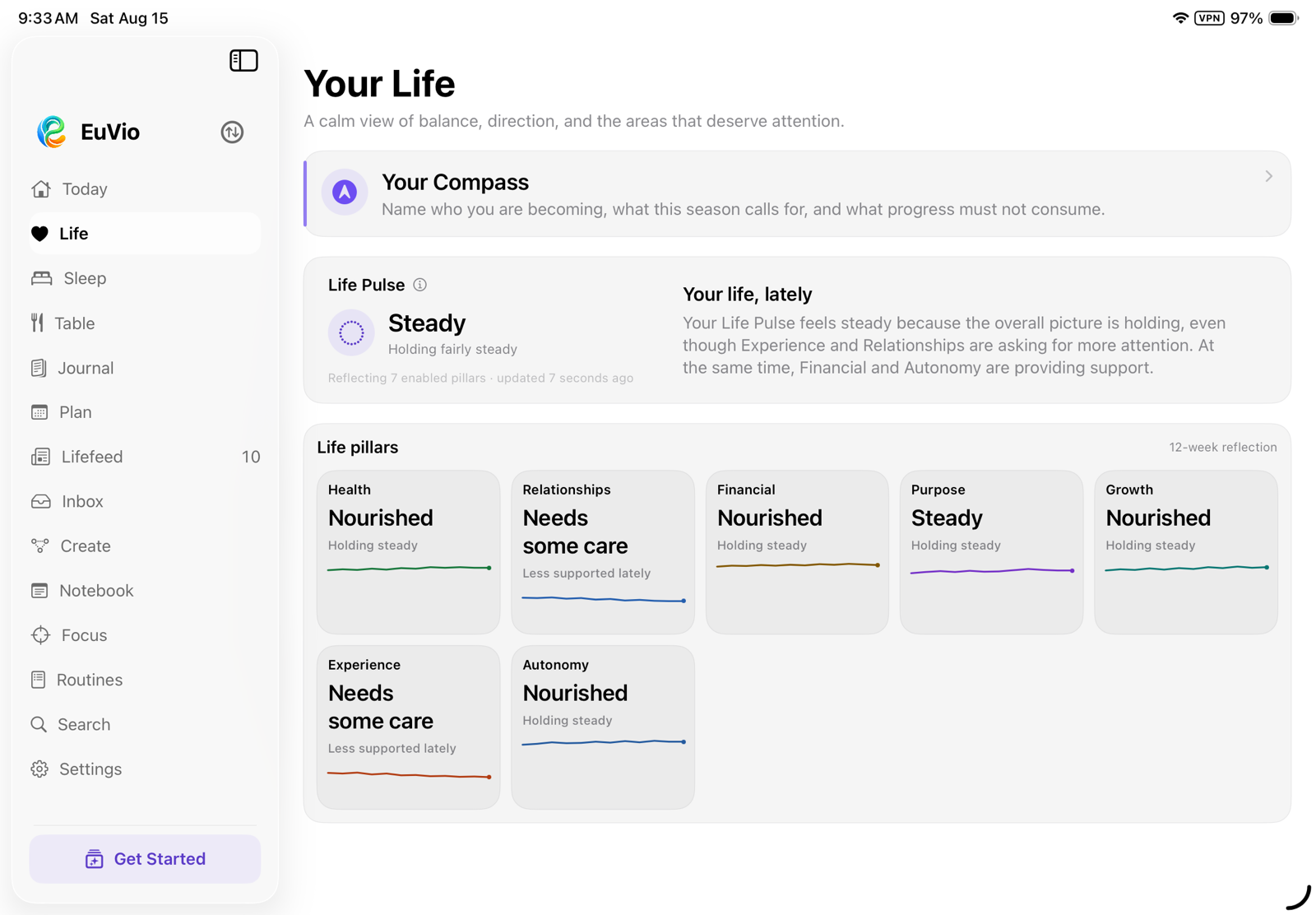
EuVio Your Life view with Compass, Life Pulse, and life pillars
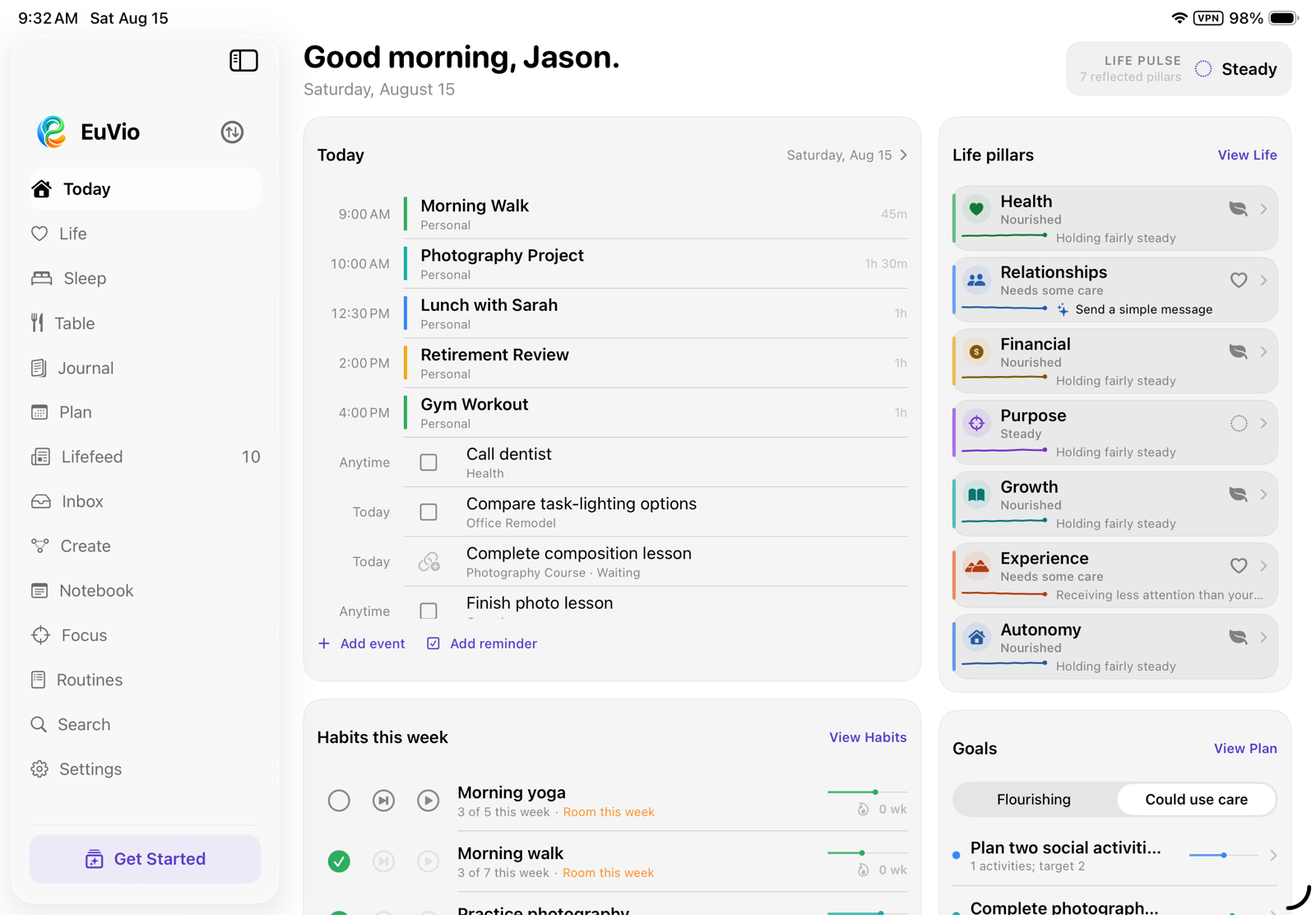
EuVio Today view combining schedule, reminders, habits, projects, and life pillars
01

Orient your day

See what matters before deciding what to do.

EuVio assembles the day from the systems you already use, then gives the information a calmer hierarchy.

Today

A readable daily dashboard

What it is for: Understanding the shape of today without opening five different apps.

What it does

  • Combines today’s Apple Calendar events, Apple Reminders, project tasks, habits, goals, upcoming experiences, and life-pillar context.
  • Provides direct editing and completion paths back to the original records.
  • Includes an Apple Pencil scratchpad that can be kept as a Notebook page.
  • Adapts its editorial layout to the available iPad size, orientation, and accessibility settings.

What is distinctive

Today is not another inbox. It deliberately mixes commitments with meaning: schedule beside habits, project work beside the life areas it supports. Apple’s apps remain the source of truth; EuVio supplies the reading order.

Quick Capture

One doorway for new information

What it is for: Recording something immediately without first deciding which part of the app to visit.

What it does

  • Creates a task, event, note, goal, project, habit, or journal entry from one compact sheet.
  • Offers the right organizing fields only after the capture type is known.
  • Writes tasks and events into Apple Reminders and Calendar when those types are selected.
  • Can connect local records to a life pillar, goal, project, or Compass direction.

What is distinctive

The first job is getting the thought out of your head. Structure is added afterward, and the destination stays honest: an Apple task remains an Apple task; a EuVio reflection remains local.

Lifefeed

A private, source-linked timeline

What it is for: Seeing recent and upcoming changes across life without surrendering them to an engagement feed.

What it does

  • Collects useful dates, recent mail, plan changes, habit context, and selected meaningful items.
  • Keeps factual cards linked to the record that produced them.
  • Separates source facts from optional “For You” observations.
  • Refreshes privately from information already available on the iPad.

What is distinctive

It has no infinite-scroll business model and does not infer identity from activity. The feed is finite, inspectable, and designed to return you to the underlying item—not keep you consuming.

Search

One search across the whole system

What it is for: Finding an idea or commitment when you remember the meaning but not where it was stored.

What it searches

  • Compass directions, protections, seasons, and life pillars.
  • Calendar events, reminders, goals, habits, projects, and focus history.
  • Journal and sleep entries, Notebook pages, and locally cached mail.
  • Each result opens its actual destination rather than a detached copy.

What is distinctive

Search happens against the local library and connected Apple records. There is no search index on a EuVio server and no query history sent back to the developer.

02

Understand your life

Reflection that informs action without grading you.

The app treats your perspective as primary evidence. Measurements can add context, but they do not get the final word.

Life, Compass & Pillars

Direction above productivity

What it is for: Naming what matters, what must be protected, and what this season of life is asking of you.

What it does

  • Defines personal Compass directions, protective guardrails, and a current life season.
  • Uses configurable life pillars with gentle check-ins and history graphs.
  • Builds a Life Pulse and weekly review from the user’s own reflections and chosen pillar priorities.
  • Shows connected goals, projects, reminders, and activity without treating correlation as cause.

What is distinctive

Life Pulse is not a performance score. The weighting comes from what you say matters, trends are described as tentative signals, and connected Apple data remains supporting context rather than an authority over your life.

Journal & Reflection

Remember what mattered

What it is for: Keeping a durable narrative of lived experience without creating a daily obligation.

What it does

  • Stores dated entries with optional connections to life pillars and Compass directions.
  • Supports editing, browsing, and searching entirely on the iPad.
  • Offers an optional monthly AI reflection using a connection selected specifically for that reflection.
  • Turns accepted next-step suggestions into editable tasks, habits, or projects—never automatic changes.

What is distinctive

Reflection is available when useful, not demanded by a streak. If AI is used, Journal permission is checked for the selected connection at the moment of sharing, and the reflection arrives as a complete reading experience before next steps interrupt it.

Sleep

A morning record, not a diagnosis

What it is for: Noticing relationships among timing, interruption, dreams, and how the morning actually feels.

What it does

  • Records bedtime, wake time, awake periods, sleep quality, refreshedness, sleepiness, morning feeling, dreams, and optional context.
  • Uses last night’s Apple Health sleep session as an editable starting point when permitted.
  • Tracks bedtime and wake-time consistency against personal targets.
  • Shows recent patterns and exports the complete sleep journal as CSV.

What is distinctive

The subjective morning record sits beside measured duration instead of beneath it. EuVio describes patterns and variation, explicitly avoiding diagnosis or a universal definition of “good” sleep.

Make Space & I’m Stuck

Support for release and difficult moments

What it is for: Finding a humane next move when the problem is overload, uncertainty, or a commitment that no longer fits.

What it does

  • Make Space reviews active goals and projects for what might rest, change form, or close.
  • “This still belongs” protects an item from repeated review for a quiet period.
  • I’m Stuck guides the user through setting everything else down, naming the knot, changing the lens, and leaving with one small choice.
  • A result can become a task, Notebook page, or future rest date—or remain nothing at all.

What is distinctive

Neither experience diagnoses, scores, or pressures. The implementation protects rest as a legitimate outcome and never closes a commitment on the user’s behalf.

03

Plan and follow through

Enough structure for real work, without losing the reason for it.

Simple intentions can stay simple. Complex outcomes can gain milestones, dependencies, resources, and working views when they need them.

Plan

Calendar, tasks, goals, habits, projects, and lists

What it is for: Turning intention into time, next actions, and a visible body of work.

What it does

  • Edits Apple Calendar events and Apple Reminders inside the same planning view.
  • Creates local goals with status, progress, target dates, pillars, and Compass provenance.
  • Creates habits with frequency, evidence history, and links to routines.
  • Maintains reusable lists and libraries that can be attached to work.

What is distinctive

Plan does not force every commitment into one database. System records remain portable in Apple’s apps, while EuVio adds the local relationships—why this matters, what larger outcome it serves, and where it belongs in life.

Projects

Four views of the same outcome

What it is for: Managing multi-step work at the level of detail it actually requires.

What it does

  • Provides a timeline plan with task bars, dates, milestones, and dependency paths.
  • Groups work by milestone in a board-style view and provides a compact sortable task list.
  • Tracks people, tools, materials, money, and information in a dedicated Needs view.
  • Supports blocked-task explanations, actual completion dates, filters, linked lists, and attached routines.

What is distinctive

The timeline, milestone board, working list, and resource view are projections of one project—not separate copies. Dependencies explain what a task is waiting on, while Compass and goal links preserve provenance.

Focus

Make room for one thing

What it is for: Temporarily narrowing the field without pretending the rest of life disappeared.

What it does

  • Runs a focused session connected to a project, goal, or life pillar.
  • Records duration, completion state, notes, and recent history.
  • Shows weekly time and session counts without streak mechanics.
  • Returns the user to the larger workspace when the session ends.

What is distinctive

Focus is a temporary room, not a permanent worldview. Sessions can inherit meaning from the work they serve, and the history is descriptive rather than competitive.

Routines

Sequences that lower the cost of beginning

What it is for: Returning to a known sequence when repeatedly choosing the next step is the hard part.

What it does

  • Combines activities, timers, quantities, exercise sets, and conditional branches.
  • Supports optional opening, main, and closing segments with separate guidance.
  • Provides spoken titles, configurable sound sets, volume shaping, halfway cues, and haptics.
  • Retains completed and partial runs, then shows when routines tend to happen and which steps are usually completed or set down.

What is distinctive

The runner is designed around transitions, not only timers. Evidence is presented as practice patterns—“usually done,” “often set down,” “runs long”—without streaks, failure badges, or punishment for an interrupted run.

Table

Food in time, not food as judgment

What it is for: Understanding what and when you eat through a visual daily record.

What it does

  • Builds a reusable, reorderable palette of meals and foods.
  • Logs an item by dragging it directly onto a time-of-day line with haptic detents.
  • Shows daily nutrition details, recent frequency, and timing patterns across history.
  • Can write user-entered nutrition values to Apple Health when explicitly enabled.

What is distinctive

Table makes timing spatial and reusable meals frictionless. Its visual language emphasizes rhythm and recall instead of calorie policing, moral labels, or a single “perfect” target.

04

Think and communicate

Room for language, sketches, connections, and conversation.

EuVio keeps the tools for thinking near the plans and relationships the thinking belongs to.

Notebook

A local rich notebook built for iPad

What it is for: Writing, drawing, collecting source material, and linking ideas back to the rest of life.

What it does

  • Supports rich text, checklists, photos, document scans, files, and inline Apple Pencil drawings.
  • Organizes pages with nested folders, tags, search, and Recently Deleted.
  • Links pages to goals, projects, pillars, events, reminders, and other pages, with backlinks shown automatically.
  • Exports a rich document containing the page’s writing and drawings.

What is distinctive

The Notebook is not a web editor placed in an iPad frame. Text, Pencil drawings, scans, and app-owned links are native parts of the same local document, and the backlinks preserve context across the rest of EuVio.

Create

A spatial studio for unfinished thought

What it is for: Exploring an idea before it is ready to become a plan or polished note.

What it does

  • Places ideas, questions, possibilities, actions, and sketch cards on a zoomable canvas.
  • Creates labeled connections, branches, free-form Pencil marks, and an automatic linear outline.
  • Starts from blank, mind-map, decision, possibilities, Make Space, Compass Discovery, or Season Map templates.
  • Promotes a card into a concrete capture such as an Apple Reminder, Notebook page, goal, project, habit, or journal entry.

What is distinctive

Create keeps ambiguity visible instead of forcing every thought into a task. Spatial distance, explicit connection labels, card roles, and the outline offer multiple ways to understand the same material.

Mail

A capable inbox without the detour

What it is for: Reading and acting on email without leaving the context of the day or project.

What it does

  • Connects Gmail, Outlook and Microsoft 365, plus secure IMAP/SMTP mailboxes.
  • Supports multiple accounts, folders, search, reading, reply, reply-all, forward, compose, drafts, attachments, flags, archive, move, and Trash.
  • Keeps per-account aliases and signatures and lets the user reconnect only the account that needs attention.
  • Can create a follow-up task from a thread or, with explicit permission, prepare an AI catch-up brief from unread messages.

What is distinctive

Mail travels directly between the iPad and the provider. Credentials live in Keychain, each account has an independent local cache, and EuVio intentionally omits permanent deletion. Initial download begins only after setup closes.

05

Optional intelligence

Bring the model you choose. Share only what you approve.

EuVio is complete without AI. Intelligence features appear only after the user deliberately enables and configures them.

Connections & Chat

Multiple models, one permission boundary per connection

What it is for: Thinking with a language model while keeping provider choice and data boundaries visible.

What it does

  • Connects OpenAI, Anthropic Claude, Google Gemini, local servers such as Ollama or LM Studio, and other OpenAI-compatible endpoints.
  • Tests a connection, discovers advertised models, and lets the user select one before saving.
  • Keeps multiple connections, designates a primary, and permits seamless per-chat switching among valid connections.
  • Stores conversations locally and can move selected output into a Notebook page.

What is distinctive

Every connection has its own permissions for Calendar, Reminders, Health, EuVio records, Sleep, Notebook, Mail, Compass, and a Personal Brain. The context viewer shows what was included, excluded, or authorized but empty; the raw-prompt viewer shows the exact model input.

Research, Personal Brain & Actions

Tools remain inspectable and interruptible

What it is for: Extending a chosen model with current web results or user-owned remote memory without giving it silent control.

What it does

  • Optionally performs web research through a user-configured Brave Search connection.
  • Can connect to a remote MCP Personal Brain for user-owned memory and knowledge.
  • Labels external context and treats retrieved text, mail, and personal records as untrusted reference material.
  • Requires a visible approval before a model-requested change or external tool action can run.

What is distinctive

The model can propose; the user authorizes. Tool name, arguments, connection, model, endpoint, sent time, and raw input are exposed so “AI assistance” does not become an invisible side channel.

06

Own your data

Privacy is the architecture, not a setting hidden at the end.

No EuVio account, no EuVio cloud, no analytics, no ads, and no server belonging to the developer.

Local Library & App Lock

Your iPad is the home of the app

What it is for: Keeping personal planning, reflection, and creative work private by default.

What it does

  • Stores plans, journals, routines, Notebook content, Create boards, focus history, and chat history locally.
  • Stores passwords, tokens, and API keys in the iPad Keychain.
  • Offers an additional Face ID app lock and an in-app view explaining where each category of data lives.
  • Allows all EuVio-owned local data to be erased from Settings.

What is distinctive

There is no EuVio identity to correlate and no backend copy for the developer to inspect. Apple records remain in Apple’s databases; mail remains at the mail provider; local records remain on the iPad.

Encrypted Archive

A portable library with no recovery back door

What it is for: Moving the local library to another iPad or keeping an independent safekeeping copy.

What it does

  • Creates one passphrase-encrypted archive containing the local EuVio library and allowlisted preferences.
  • Verifies the archive and requires it to be saved outside EuVio as a distinct step.
  • Creates a verified safety copy before replacing a library during restore.
  • Can optionally place a temporary seven-day convenience key in the user’s iCloud Keychain.

What is distinctive

The passphrase is never stored and cannot be recovered by Shady Valley Software. Credentials and mail caches never travel in the archive; connected accounts return as reconnect-required stubs and reload from their real providers.

Accessibility & Adaptation

An iPad interface that makes room

What it is for: Keeping a dense, capable app readable across iPad sizes, orientations, and accessibility preferences.

What it does

  • Reflows primary workspaces for compact, regular, and expansive iPad layouts.
  • Provides dedicated accessibility layouts for larger Dynamic Type sizes.
  • Respects Reduce Motion, increased contrast, and reduced transparency.
  • Supports keyboard commands, Apple Pencil, touch, drag and drop, and collapsible sidebars where appropriate.

What is distinctive

Accessibility is handled at the feature level instead of by simply enlarging an unchanged desktop layout. Complex views switch structure so information remains operable rather than merely visible.

The through-line

The system is capable. The posture is gentle.

EuVio can hold a complicated project, a difficult morning, a full inbox, a half-formed sketch, and a long-term direction. Its job is to preserve the relationships among them without claiming ownership of your attention—or your data.

Read the privacy architecture